


Docs
Kafka
Measurements can be streamed from an external Kafka broker into Blockbax by using an inbound connector. Measurements and events can also be streamed from Blockbax to an external Kafka broker by using an outbound connector.
Inbound connectors
Inbound connectors are custom integrations to ingest measurements into the Blockbax Platform. They allow you to extract information from a custom payload and to ingest measurements in the format that Blockbax expects. They also allow you to log information during this conversion. A payload conversion script is defined as a plain JavaScript function. A dedicated page about payload conversion describes how to develop such a function.
Note that we do not process payloads with a size over 200 KiB. When this happens an error log will be output.
Configuration options
The following configuration options are available:
| Field | Description |
|---|---|
| State | Active or Inactive |
| Name | A descriptive name to recognize and find your inbound connector |
| Auto-create subjects | Automatically creates a subjects based on the incoming payload (see below) |
| Bootstrap servers | A comma separated list of the bootstrap servers, e.g. my-bootstrapserver-1.com:9026,my-bootstrapserver-2.com:9026 |
| Topic | The topic that the inbound connector will consume from |
| Consumer group ID | The consumer group ID that the client will use |
| Initial position in stream | The place in the stream to start (only has effect when the broker does not recognize the consumer group id) |
| Trust store certificate chain | The server certificate that will have to be trusted by the client (has to be in the pem format) |
| Authentication | Authentication method to use, SASL/PLAIN and SSL are supported (this translates to the SASL_SSL and SSL value for the security.protocol Kafka client setting) |
Configuration options when authenticating using SASL/PLAIN:
| Field | Description |
|---|---|
| Username | The username that the client will connect with |
| Password | The password that the client will connect with |
Configuration options when authenticating using SSL:
| Field | Description |
|---|---|
| Client certificate | The client certificate that the client will use to connect with (has to be in the pfx format) |
Auto-create subjects
Measurements are mapped to subjects and metrics by so-called ingestion IDs. By default, an ingestion ID is derived from the subjects’ external ID and the metrics’ external ID (e.g. MyCar$Location). You can also override this default with a custom ingestion ID. If a measurement with an unknown ingestion ID is encountered, Blockbax tries to find a single metric with an external ID equal to the part after the dollar sign. If this is successful, a subject will be created with an external ID equal to the part before the dollar sign. For example, for the ingestion ID MyCar$Location a subject with external ID MyCar will be created if the metric with external ID Location can be linked to exactly one subject type.
Outbound connectors
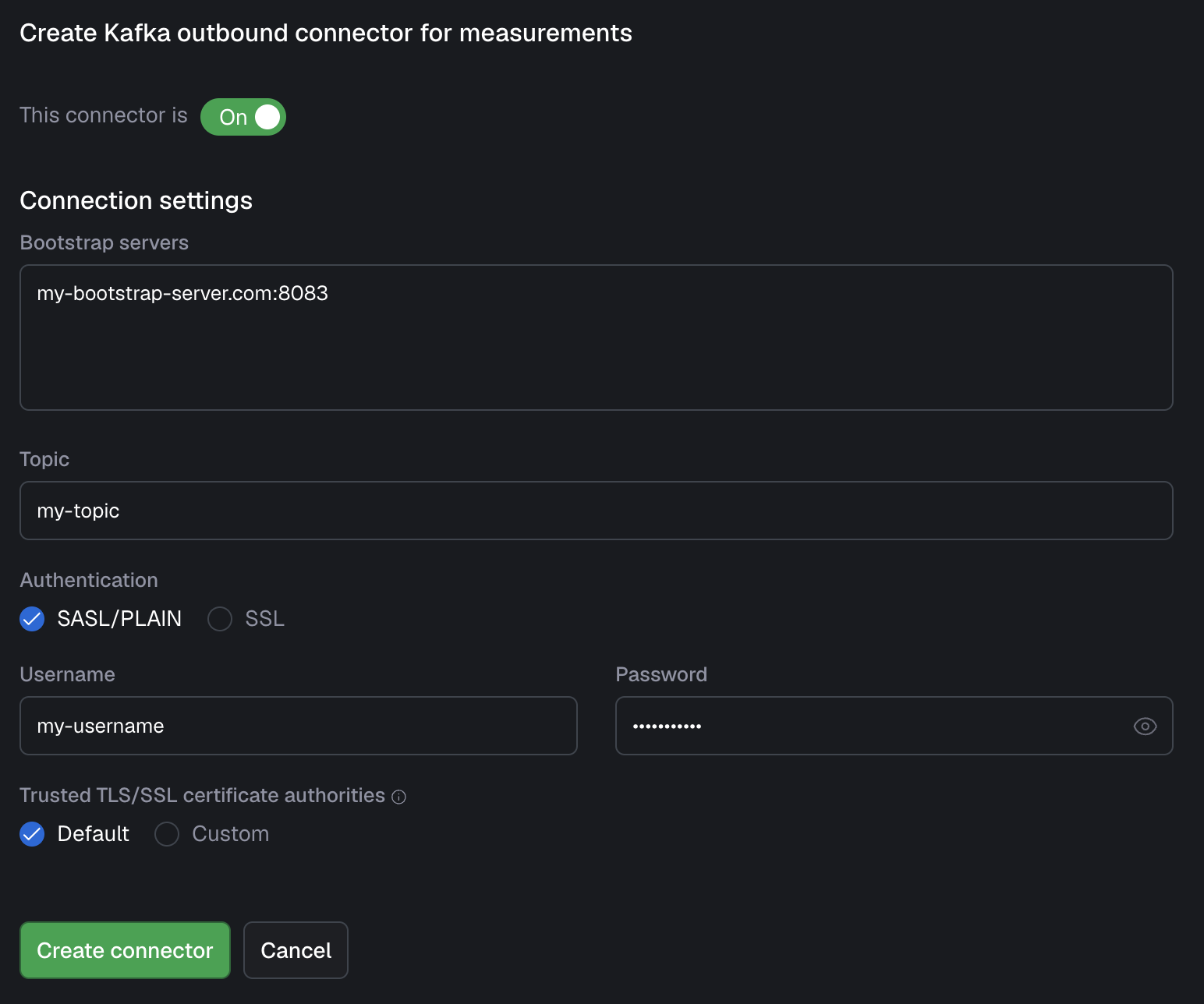
Outbound connectors give you the opportunity to stream your data out of the Blockbax platform and into your own infrastructure. You are able to configure two outbound connectors, one for events and the other for measurements. when these are set up, data is forwarded whenever an event is triggered or measurement is received. Note: you can either have your data produced to an Azure Event Hub or to a Kafka cluster, not both.
For authentication there are two options: SASL/PLAIN (username and password) and SSL (certificates), one of which needs to be supplied. All the settings can be seen below:
| Field | Description |
|---|---|
| Bootstrap servers | The host:port pairs to your bootstrap server(s), in separate rows |
| Topic | The topic you would like to have your data streamed to |
| Username (SASL/PLAIN) | The username belonging to the Kafka user that Blockbax will connect with |
| Password (SASL/PLAIN) | The password belonging to the Kafka user that Blockbax will connect with |
| Client certificate (SSL) | The certificate (pfx format) that contains the client certificate |
| Truststore certificate chain (SSL) | The certificate (pem format) of the certificate that the broker uses |
Connection guide
Here you can find the information to help you get started quickly with this integration. In this guide we use the Confluent Platform as an example. This guide should be usable for self-hosted or other managed Kafka providers as well, in case you need help contact us.
Stream measurements from Confluent Platform to Blockbax
Several steps in both Confluent Platform and Blockbax are needed to get the data from Kafka to Blockbax:
- Create an API key for the cluster within the Confluent Platform
- Connect it to a service account (or create a new one)
- Give the account access to READ the consumer group that is going to be used and the access to READ the topic with the data on it
- Copy the access key and secret, you need it in the following step
- Create an inbound connector for Kafka in Blockbax
a. Select the ‘SASL/PLAIN’ option (should be already selected) and fill in the ‘username’ and ‘password’ fields with the Confluent key and secret respectively
b. (optionally) You can also authenticate by using client certificates, this can be done by selecting ‘SSL’ and uploading the client certificate (
pfxformat) and the trust store certificate chain (pemformat). For simplicity this is not included in the connection guide, however we recommend this for production use. - Validate after creation if an info log appears that it is able to connect successfully. This can take up to 30 seconds.
Steps to stream data from Blockbax to Confluent Platform
To stream data from Blockbax to Kafka, the same steps have to be taken as with streaming data from Kafka to Blockbax, only the topic READ access has to be replaced with topic WRITE access (no consumer group info has to be supplied). After this streaming the data out of Blockbax can be setup by creating an Outbound connector similarly to the inbound connector earlier.